SSH hosts
Keep your servers in one list, see at a glance which are up, and open a shell on any of them with one key. Passwords stay in your Keychain.
The Hosts screen
Open Hosts in the top bar. Hosts are listed by group, each with how it's doing: Reachable, Connected, Needs sign-in, Refused, Unreachable, Host key changed and so on. Select one for its details: latency, system, uptime, load, its port forwards and sessions.
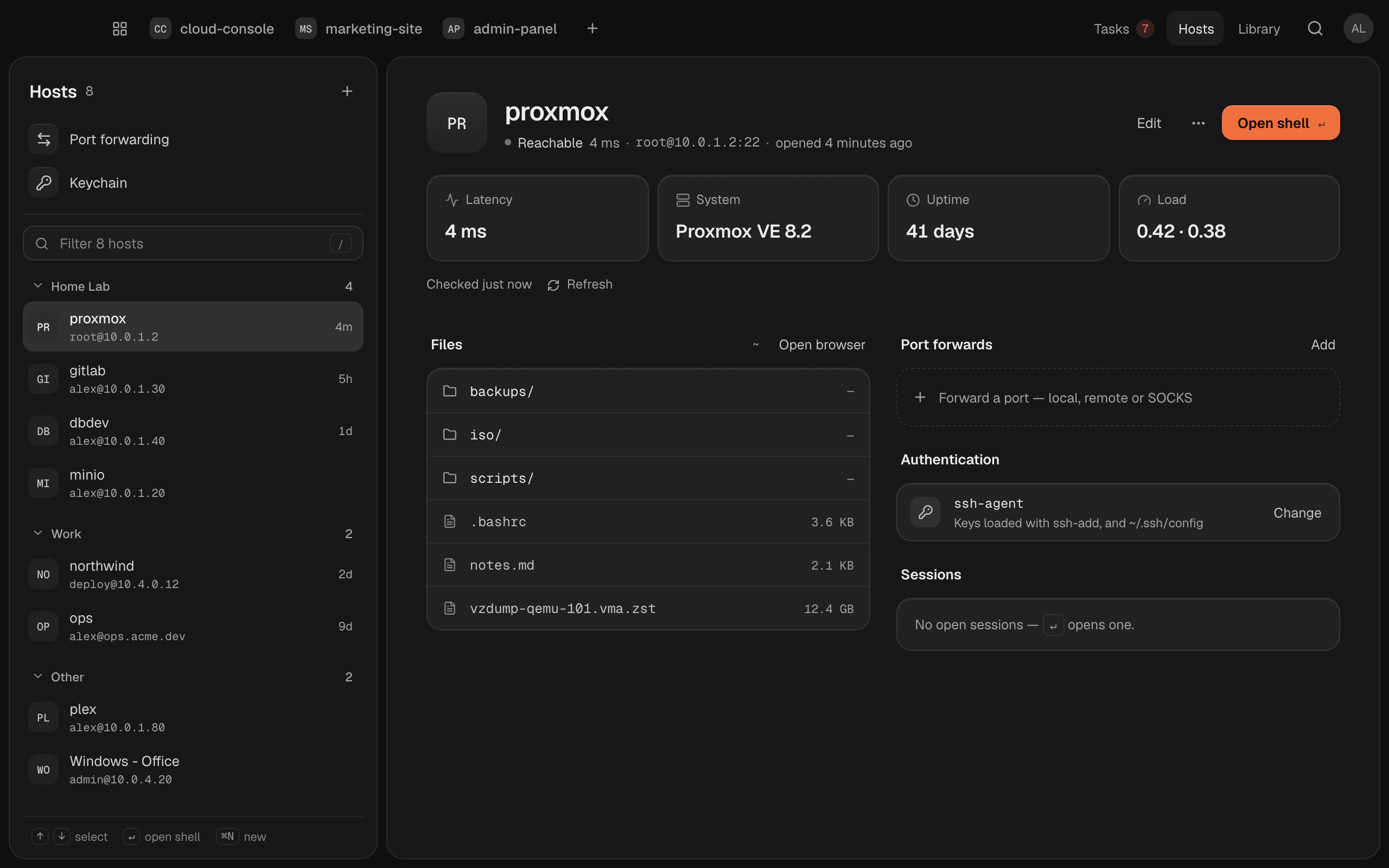
Filter ( or ) narrows the list as you type.
Several at once
-click hosts to select them, -click to select everything in between, or for all of them; Select in a host's menu starts it too. A bar then moves them to a group or deletes them at once. ends selecting.
Add a host
Click + and choose New host (). Fill in:
- Address: a name or IP, such as
example.comor10.0.0.4. - Name, Username, Port (22 unless you change it) and Group.
- Operating system, Color and Tags, if you like.
Then choose how it signs in (below), and click Add host. Test first, if you like: it checks that the host is reachable, that you can sign in, and which system it runs.
Already in ~/.ssh/config?
+ › Import from ~/.ssh/config adds the hosts from your SSH config, in a group called SSH config.
How it signs in
| Method | What it uses |
|---|---|
| SSH Agent | Your running ssh-agent and ~/.ssh/config. Chosen unless you pick another |
| Key | A key file: one of yours, one made in Termlux, or a custom path. Security keys (FIDO2 sk- keys) and certificates work |
| Password | A password stored in the macOS Keychain and filled in when you connect. It's never written to disk or put on a command line, and a jump host's password or a code is asked in the terminal |
A key is better than a password. See SSH keys to make one and put it on the server.
More options
- Jump host (ProxyJump): connect through another server, written
user@bastion. - SSH options: Keep-alive (on unless you turn it off), Agent forwarding, X11 forwarding and Compression.
- On connect: a command to run after connecting, before your shell.
- Environment variables: sent with SSH's SetEnv. The server must allow them with
AcceptEnv.
Connect
Select a host and press , or choose Open shell. The shell opens as its own tab in the top bar; closes it. You can also type a host's name in .
A shell needs a workspace to belong to; make one first if you have none.
Right-click a host for Edit… (), Test connection, Duplicate (), Copy ssh command, Copy address and Delete host… ().
When it can't connect
Termlux tells you what went wrong: Couldn't sign in, Connection refused, Host not found, Connection timed out, Host unreachable, or Connection lost. It keeps trying for a minute, then gives up.
Host key changed
If the server's key isn't the one you connected to before, Termlux stops and asks whether to trust the host's new key. That happens when a server is reinstalled, but it can also mean someone is in between. If you know why it changed, choose Forget old key and connect.
On your other Macs
Hosts sync to your other Macs signed in to the same account: address, user, port, group and settings. Passwords and keys never leave the Mac they're on.
- To keep one host on this Mac only, turn off its Sync to my other Macs. It then says Only on this Mac.
- To stop host sync on this Mac, turn off Settings › Account › Hosts sync to your other Macs.
- A host that came from another Mac signs in with that Mac's key. If this Mac has the same key (same fingerprint), it's used. If not, the host says Key not on this Mac: click Pick a key and choose one.
- A password doesn't come along: the first connection asks for it.
- The command run on connect and agent or X11 forwarding don't come along either: set them on each Mac.
- When another Mac changes where a host connects (its address, port, user or jump host), this Mac asks before the next connection, showing the new address. Connect only if it's a server you know: a saved password goes to it.
Deleting a synced host asks whether to remove it Only on this Mac or Remove on all your Macs.
Ask Claude
Claude can look at your hosts and propose changes: add a host, set up a key, open a port forward. Every change opens in a Termlux dialog for you to check, change or decline, whatever Claude's permission mode. Claude never sees a password. See What agents can do in Termlux.