Several Claudes at once
Give a chat or a task its own git worktree, so several Claudes work on one project without touching each other's files. Then review, merge or discard what each one finished.
Why a worktree
Two Claudes in one folder edit the same files and trip over each other. A git worktree is a second checkout of your repository, in a folder of its own, on a branch of its own. A chat in its own worktree can change, build and test anything; your folder and the other chats see none of it until you merge.
Start a chat in its own worktree
Choose New chat in its own worktree from a session's +, a workspace's menu on its tab or on Home, or . Termlux makes a branch termlux/<name> from the branch you're on, checks it out beside your repository, and opens a chat there. The chat's header shows its branch.
The command is greyed out, with the reason, when it can't run, for example when the workspace's folder isn't a git repository.
The first time, Claude may ask whether to trust the new folder, unless you trusted the workspace's folder before.
What a new worktree needs
A fresh checkout has only what's committed: no .env, no node_modules. In the workspace's settings, under Agent & startup › Worktrees:
| Setting | What it does |
|---|---|
| Copy into new worktrees | Files copied from your folder into each new worktree; .env and .env.* unless you change it. Nothing is overwritten |
| Setup command | Runs in the chat's terminal before Claude starts, such as npm ci. A task's first message waits for it |
Tasks in their own worktree
On the task board, a task's menu has Work on it in its own worktree, and its page has In its own worktree. To run several tasks at once, each in its own worktree, see Work through it in parallel.
To review
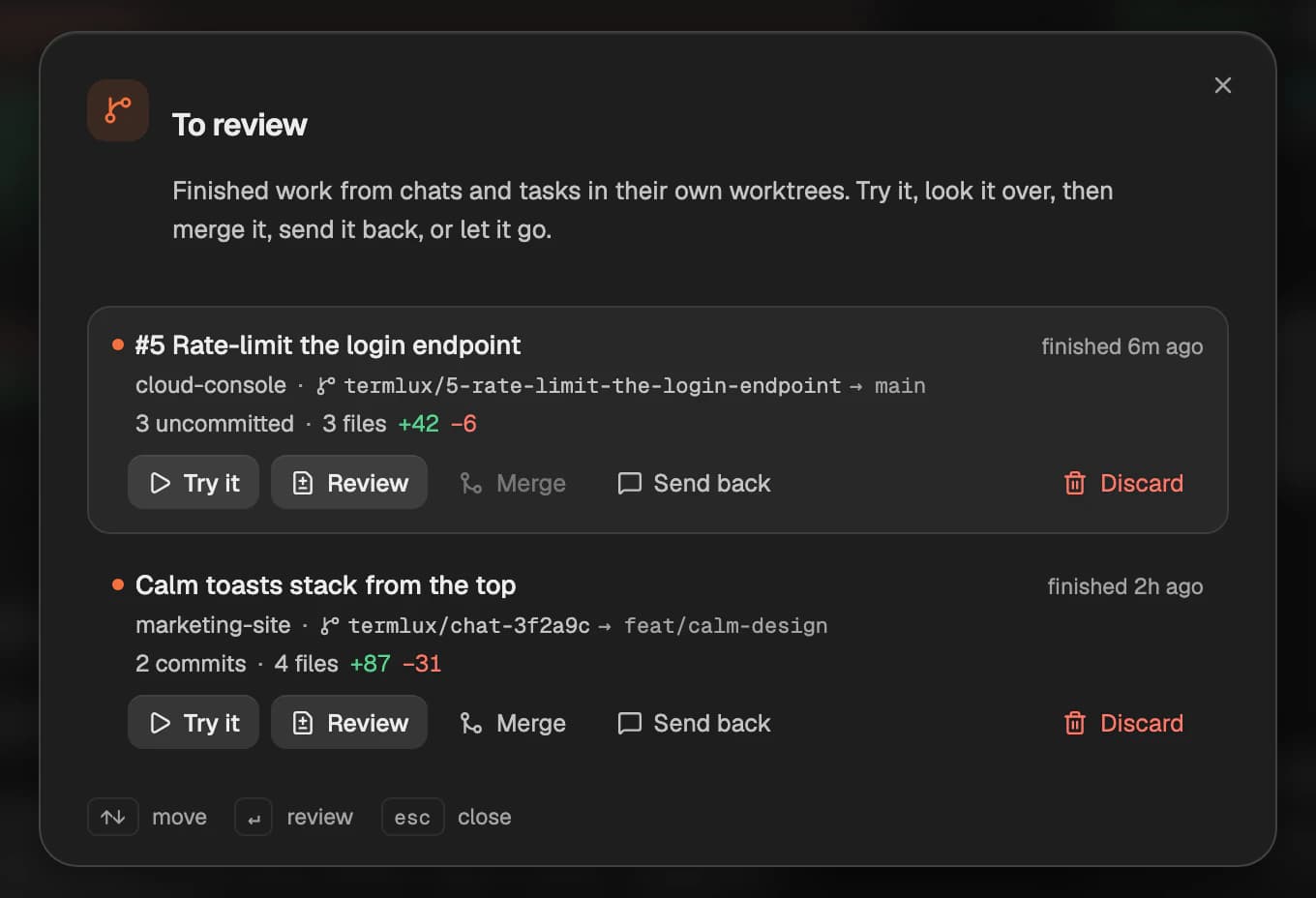
When a chat in its own worktree finishes, its work waits in To review. Open it from the count next to waiting in the top bar, or with and To review…. Each item shows the task or chat, its workspace, its branch and the branch it came from, the files and lines changed, and when it finished.
| Button | What it does |
|---|---|
| Review | Opens its changes in Review |
| Merge | Merges its branch into the branch it came from |
| Send back | Goes back to its chat, to tell Claude what to fix |
| Discard | Removes the worktree and its branch |
Merge only goes ahead when everything is committed, in the worktree and in your own folder, and git can merge without a conflict. Otherwise nothing changes, and Termlux tells you why.
Review shows uncommitted changes. If Claude committed its work, To review counts the commits, but Review doesn't show them.
Close a worktree chat
Closing a chat that has its own worktree asks what to do with the work: Merge it into the branch it came from, Keep the branch for later, or Discard it. If something stops the merge, Termlux offers Review changes first.
Deleting a workspace removes its chats' worktrees too. The confirmation names them.