Usage and limits
See how much of your Claude plan's limits you've used, where you'll be at the reset at your current pace, and what each workspace spent.
In the chat
The ring in the chat box shows the limit you're closest to, such as 5h 42%. It turns warm at 80% and hot at 95%. When this chat's context is 80% full, it shows that instead (ctx 84%).
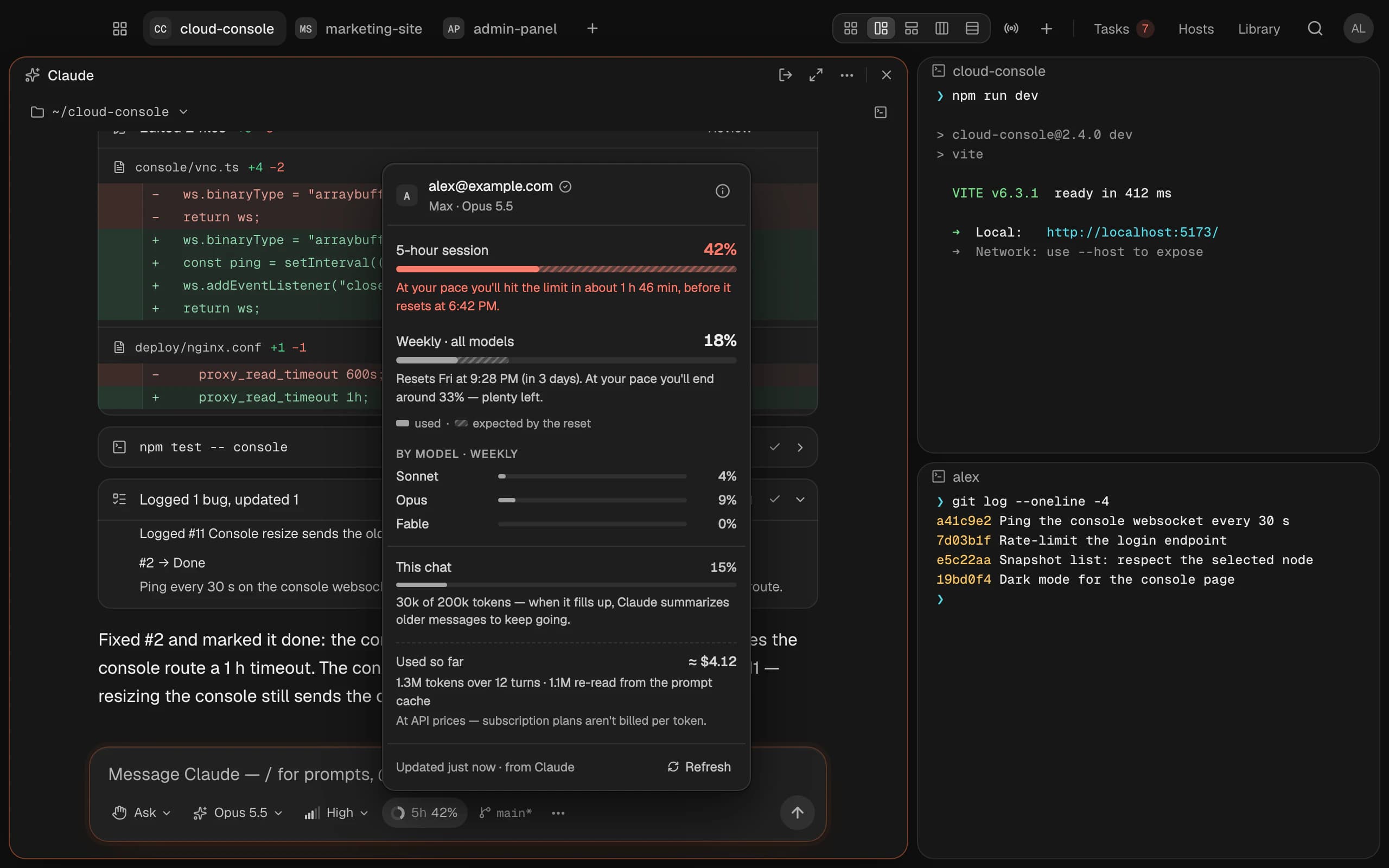
Click it for Usage and limits:
| Row | What it counts |
|---|---|
| 5-hour session | What you use in a 5-hour window, starting with your first message. Then it resets |
| Weekly · all models | A second limit over 7 days, all models together. Some models also have their own week |
| Extra usage | Usage beyond your plan, if you've turned it on with Anthropic |
| This chat | How much of this conversation Claude holds at once |
| Used so far | This chat's tokens, and roughly what they would cost at API prices |
The striped part of a bar is the forecast: where you'll be at the reset if you carry on at your recent pace. It needs a few minutes of use to appear.
If this workspace signs in to Claude with an API key or a cloud provider, plan limits don't apply: you're billed by use.
All your logins
Click your initials at the top right and choose Usage & limits, or find it with . It shows every Claude account across your workspaces (each workspace can use its own), with their limits side by side, and:
- Estimated spend · last 30 days, as a chart or a table: per day, with tokens and turns.
- By workspace: what each one spent.
Spend is estimated from Claude Code's own logs on your Mac, at Anthropic's published API prices. On a Pro or Max plan, that's what the work would have cost by use, not what you pay.
Start when the limit resets
Before Claude takes on a task or works through the board, Termlux shows where the workspace's Claude account stands. When you're near a limit (the 5-hour one at 80%, another at 90%), starting asks:
- Start now
- Start when the limit resets, at the time it shows. Termlux starts it for you then
- Cancel
At the limit, starting when it resets is the default. A waiting start shows on the board or the task, with Start now and Cancel. Waiting starts are kept while Termlux is open; if you quit, it tells you on the next launch which didn't run.
If a limit stops a chat, its banner offers Continue when it resets. Everything waits on the same workspace, so the same Claude account: Termlux never switches you to another.
Where the numbers come from
From Claude Code itself. While a chat runs, from that chat. Otherwise Termlux asks the workspace's own Claude Code, without sending a message, so it uses no tokens. Termlux never reads your Claude sign-in, and doesn't send your usage anywhere. Refresh fetches fresh numbers.